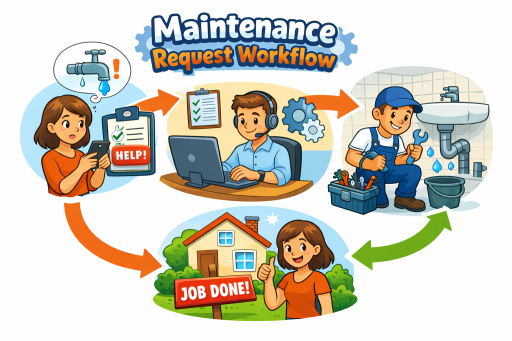
Maintenance performance is rarely limited by technician skill. It is limited by workflow friction—requests scattered across emails and phone calls, unclear approvals, manual tracking, and inconsistent follow-up. The fastest way to improve response time and accountability is to standardize a single maintenance request workflow that moves cleanly from intake to completion, while preserving visibility by unit, building, and property.
This guide lays out a practical end-to-end workflow property managers can implement immediately. It also shows how to connect the workflow to adjacent operational modules—Work Orders ↔ Reporting ↔ Inspections and Properties/Units ↔ Assets ↔ Reporting—so maintenance becomes measurable and repeatable across your portfolio.
1) Standardize resident intake and capture the right details
Most maintenance delays start at intake. If the request arrives without a clear location, category, urgency, or access details, property staff must chase information before anyone can act. Standard intake reduces follow-up, improves prioritization, and prevents work from stalling at the first step.
For consistent submission and routing, use a dedicated intake channel such as a resident maintenance requests portal that captures structured information from day one. The goal is not to add complexity for residents—it is to prevent operational rework for your team.
- Required fields: property/building/unit, issue category, description, preferred access window, photos (if applicable)
- Triage field: emergency vs routine (with clear definitions)
- Routing: automatically place the request into a review queue for the correct property team
2) Route requests into a manager review and approval stage
Approvals should be a workflow step, not an email thread. A lightweight review stage protects budgets, ensures the right priority is assigned, and creates a record of decisions. It also prevents the two common failure modes: unauthorized work or delayed work due to unclear authority.
At scale, this stage becomes stronger when permissioned by role, ensuring only the right users can approve or escalate. Role clarity also reduces “who owns this?” bottlenecks and keeps work moving. Implement portfolio-wide governance using user and role management so approvals and responsibilities are explicit.
- Review checks: confirm location, validate scope, apply priority, decide in-house vs vendor
- Approval outputs: approved work order, request for more info, deferred/scheduled work
- Audit trail: record approver and timestamp for operational accountability
3) Convert approved requests into actionable work orders
Once approved, the request must become a work order with ownership, scope, and an execution-ready format. This is where workflows either become operationally reliable or stay reactive. A structured work order reduces ambiguity and keeps staff focused on execution rather than coordination.
Use a system designed for end-to-end execution such as work order management software for property maintenance, where approved requests convert into assigned work orders with consistent statuses and documentation requirements.
- Work order standards: scope, priority, SLA target, required materials, access instructions
- Ownership: single accountable assignee (with the option to collaborate as needed)
- Scheduling: defined target dates and escalation rules for aging work
4) Tie every work order to the correct property, building, and unit
Work order data is only useful when it is location-accurate. Without a consistent property structure, history becomes fragmented and reporting becomes unreliable. Ensuring each request and work order is tied to the right place enables unit-level continuity and portfolio-level insight.
Maintain a clean location model through property, building, and unit management so you can track recurring issues by unit, compare performance across buildings, and avoid misrouted work.
- Location discipline: enforce property/building/unit mapping at intake and at work order creation
- Unit history: preserve prior work, outcomes, and recurring issue patterns
- Operational clarity: reduce duplicate work orders and incorrect dispatches
5) Track status updates, notes, and completion evidence
Status tracking is not busywork. It is the control layer that prevents interruptions (“what’s the status?”), reduces resident escalations, and gives managers a reliable view of pipeline health. Standard statuses also create consistent reporting and an audit trail for every job.
Define a simple status model and require minimal but consistent documentation at each step:
- New / Pending Review → request logged and awaiting manager review
- Approved → authorized for execution
- Assigned → owned by staff/vendor with a target date
- In Progress → work underway, notes added as needed
- Blocked → waiting on parts, access, vendor, or authorization (include reason)
- Completed → work finished with completion notes and evidence if required
6) Use inspections to validate quality and trigger follow-up work
Completion is not always the same as resolution. When inspection is built into the workflow, teams reduce repeat requests, ensure safety and compliance where applicable, and create a documented record of outcomes. This is the “close the loop” step that separates reactive maintenance from controlled operations.
Support verification and follow-up using property inspection software for buildings and units. When inspections are connected to the work pipeline, any deficiencies can immediately generate follow-up work rather than restarting the process from scratch.
- When to inspect: safety issues, major repairs, recurring problems, turnover-related work
- Inspection outputs: pass, pass-with-notes, fail (requires follow-up work)
- Documentation: findings, photos, outcomes, and next steps
7) Measure performance with dashboards and portfolio reporting
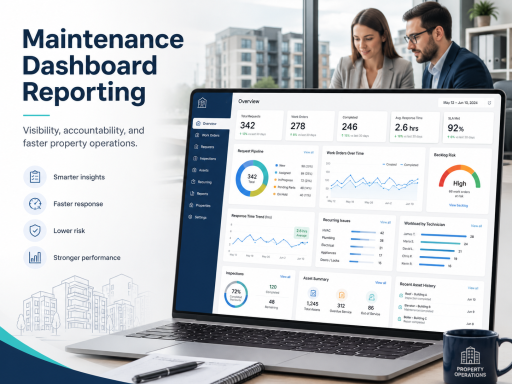
If you cannot measure it, you cannot manage it. Maintenance reporting turns activity into operational control—highlighting bottlenecks, recurring issues, and staffing constraints. It also makes response time and accountability visible across the portfolio, not just at a single site.
Build performance visibility through maintenance dashboards and reporting to track the metrics that drive resident experience and operational cost:
- Response time: request submitted → work started
- Cycle time: request submitted → completed
- Backlog health: aging open work orders by priority
- Repeat issues: recurring work by unit/building/property
- Workload visibility: assignments and throughput by staff or vendor
8) Add asset context to reduce repeat work and improve repair vs replace decisions
Recurring work orders often trace back to the same underlying assets—HVAC units, water heaters, appliances, locks, fixtures. If asset history is not accessible, teams repeat diagnostics and miss the opportunity to plan replacements. Asset context improves decision quality and reduces long-run cost.
Maintain lifecycle visibility through asset installation records, so your team can answer, “What was installed here, and when?” When paired with reporting, asset history helps identify chronic failures and supports repair-versus-replace planning based on evidence, not anecdotes.
- Track: asset type, model/serial (if applicable), install date, location
- Link: work order history to the related asset
- Use: reporting to find patterns by asset age, type, or location
9) Implement the workflow within a unified property operations platform
Each step above can be done manually, but manual processes do not scale. The operational advantage comes from centralizing intake, approvals, work orders, inspections, assets, and reporting in one system—so the workflow is not dependent on individual memory or fragmented tools.
To implement this end-to-end model as a single system of record, use property maintenance software designed to unify maintenance and operations across your portfolio.
10) Next step: choose a plan and operationalize the process
Once your workflow is defined, the fastest path to results is adopting a consistent platform and rolling it out property by property. If you are evaluating options, compare plans and choose the right fit on the pricing page.
FAQ
How do I reduce delays in the maintenance request workflow?
Standardize intake, enforce a manager review stage, convert approvals directly into work orders, and require consistent statuses with minimal documentation. Close the loop with inspections for high-risk work and use reporting to identify bottlenecks.
What metrics should property managers track for maintenance performance?
Response time, completion time, backlog aging, repeat issues, and workload distribution are the most actionable metrics. Tracking these consistently helps improve accountability and resident experience.
How do properties and assets affect maintenance reporting?
When work is tied to the correct unit/building/property and linked to asset history, reporting can reveal recurring issues, chronic failures, and lifecycle patterns—enabling better planning and fewer repeat repairs.