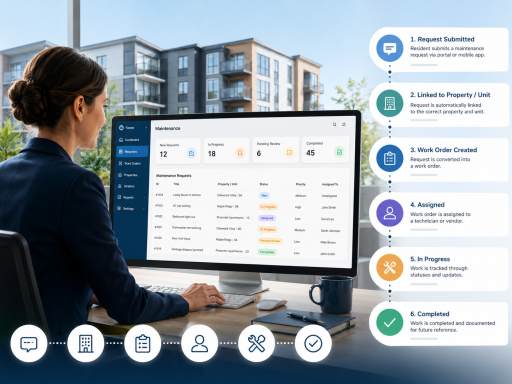
Property managers track maintenance requests by capturing resident issues, organizing them by property and unit, assigning work orders, monitoring status updates, and keeping a complete repair history for accountability.
As portfolios grow, simple email inboxes and spreadsheets become difficult to manage. A structured maintenance tracking process helps property managers reduce missed requests, improve response time, and keep every repair connected to the right property, building, unit, resident, technician, or vendor.
Why Maintenance Request Tracking Matters
Maintenance requests are one of the most important daily responsibilities for property managers. A resident reports a leak, an appliance stops working, a common area light goes out, or a building system needs attention. If that request is not tracked properly, the issue can be delayed, duplicated, forgotten, or closed without enough documentation.
Property managers use maintenance tracking software to create a clear record of each issue from submission to completion. This helps teams understand what was reported, when it was received, who was assigned, what action was taken, and whether the repair was completed.
Step 1: Capture the Maintenance Request
The tracking process begins when a resident, tenant, staff member, or manager submits a maintenance request. The request should include the property, building, unit, contact information, issue description, photos if available, access notes, and urgency level.
A good maintenance request software system keeps these details organized so the manager does not need to search through emails, text messages, handwritten notes, or separate spreadsheets.
Step 2: Categorize and Prioritize the Issue
After the request is received, the property manager reviews the issue and decides how it should be handled. Emergency problems such as active leaks, electrical hazards, lock issues, or heating failures may require immediate attention. Lower-priority requests can be scheduled based on team availability.
Categorizing requests by plumbing, electrical, HVAC, appliance, exterior, common area, safety, or general repair helps property teams understand workload patterns and identify recurring maintenance problems.
Step 3: Convert the Request Into a Work Order
Many maintenance requests need to become work orders. A work order gives the task structure: who is responsible, what needs to be done, when it should be completed, and what status it is currently in.
Using a work order management software workflow helps property managers assign tasks to in-house maintenance staff or outside vendors while keeping the original resident request connected to the repair record.
Step 4: Track Status Updates
Status tracking is what turns a request list into an operational system. Common statuses may include new, reviewed, approved, scheduled, in progress, waiting on vendor, waiting on parts, completed, or closed.
Clear statuses help property managers know what still needs attention. They also help maintenance coordinators avoid calling vendors repeatedly or asking technicians for updates that should already be visible in the system.
Step 5: Assign Staff or Vendors
Property managers often need to decide whether a task should go to an internal technician, a preferred vendor, a specialist, or a property supervisor. Assignment tracking creates accountability and makes it easier to see who owns each task.
This is especially important for multifamily communities, rental portfolios, commercial properties, and property management companies handling multiple locations at the same time.
Step 6: Document Completion
A maintenance request should not simply disappear after someone says it is done. The completion record should show what was repaired, when it was completed, who completed it, whether parts or vendors were involved, and whether any follow-up is needed.
This maintenance history can help with resident communication, owner reporting, inspections, budgeting, vendor evaluation, and future troubleshooting.
A Better Way to Track Maintenance Requests
TaskEstate helps property teams organize maintenance requests, convert them into work orders, track assignments, and maintain clearer repair records across properties, buildings, and units.
Explore Resident Maintenance RequestsWhy Spreadsheets Are Not Enough
Spreadsheets may work when a property manager has only a few requests per month. But as request volume grows, spreadsheets become harder to manage. They do not automatically connect resident details, property records, assignments, communication, status changes, inspections, and work order history.
Property management maintenance software gives teams a more reliable process. Instead of manually updating rows and searching through old messages, managers can use one system to track request details, work order progress, and maintenance performance.
Important Maintenance Request Metrics to Track
Property managers should not only track individual requests. They should also monitor maintenance performance across the portfolio.
- Number of new maintenance requests
- Open work orders by property or unit
- Average response time
- Average completion time
- Requests waiting on vendors
- Repeat maintenance issues
- Emergency versus routine requests
- Completed work orders by technician or vendor
- Maintenance cost trends
How TaskEstate Supports Maintenance Request Tracking
TaskEstate is designed for property managers who need a structured way to manage maintenance operations. It helps teams move beyond scattered communication and create a clearer workflow for requests, work orders, inspections, assets, assignments, and reporting.
With property maintenance software, managers can create a more consistent process for handling maintenance from the first request to final completion.
Final Thoughts
The best way for property managers to track maintenance requests is to use a system that captures each request, connects it to the correct property and unit, converts it into a work order when needed, tracks progress, and preserves the maintenance history.
A clear tracking process helps property managers save time, improve resident communication, reduce missed repairs, and make better decisions across the entire maintenance workflow.