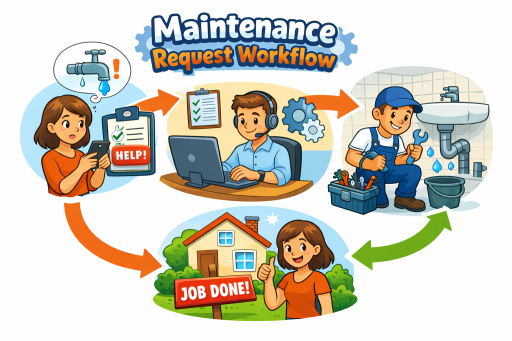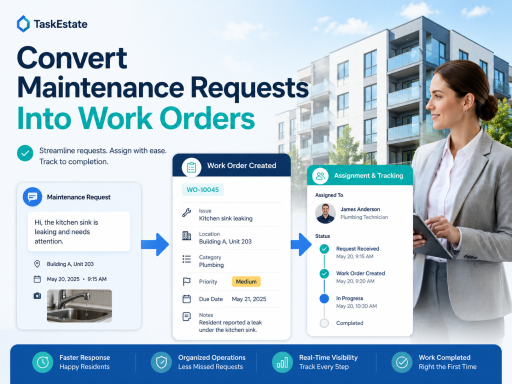
Maintenance requests are only useful when they become clear, assigned, and trackable work orders. For property managers, the conversion process is where resident issues turn into real maintenance action.
Whether your team manages apartments, rental homes, mixed-use buildings, or multifamily properties, a structured request-to-work-order workflow helps reduce missed tasks, improve response time, and create a better maintenance record.
What Is a Maintenance Request?
A maintenance request is the first report of a problem. It may come from a resident, property manager, leasing office, inspection, vendor, or internal team member. Common examples include a leaking faucet, broken appliance, HVAC issue, lighting problem, door lock concern, or damaged common-area fixture.
The request explains what needs attention, but it does not always define who should handle the work, when it should be completed, what priority it deserves, or whether approval is required. That is why property managers need a reliable way to convert maintenance requests into work orders.
What Is a Work Order?
A work order is an organized maintenance task with enough information for a technician, vendor, or maintenance coordinator to take action. It typically includes the property, building, unit, issue description, priority, assignment, due date, status, notes, and completion record.
In property management, a work order system helps teams move beyond simple message tracking. Instead of relying only on emails or phone calls, property managers can use maintenance work order software to document the full lifecycle of a repair.
Step 1: Capture the Maintenance Request Clearly
The first step is collecting accurate information. A vague request like “something is broken” can delay the entire process. A good maintenance request should include the resident’s description, location, contact information, unit number, access permission, photos if available, and urgency level.
This is where resident maintenance request software helps property teams standardize intake. Instead of receiving incomplete details across text messages, emails, and phone calls, managers can capture the issue in a structured format from the beginning.
Step 2: Review the Request Before Creating a Work Order
Not every request should immediately become a work order. Some requests may be duplicates, tenant-responsibility items, emergency issues, warranty claims, vendor-specific tasks, or inspection-related follow-ups.
Before converting the request, property managers should review:
- Is the issue valid and maintenance-related?
- Is this request urgent, routine, or preventive?
- Does it require owner or manager approval?
- Should internal staff or an outside vendor handle it?
- Is there already an open work order for the same issue?
Step 3: Convert the Request Into a Work Order
Once the request is reviewed, the property manager can convert it into a work order. This is the key transition from “reported issue” to “assigned maintenance task.”
A strong property maintenance work order should include:
- Property, building, and unit information
- Original request details
- Maintenance category
- Priority level
- Assigned technician, team member, or vendor
- Scheduled date or due date
- Status tracking
- Internal notes and completion comments
A dedicated work order management software system makes this process easier because the work order can stay connected to the original request. This helps avoid retyping details, losing resident information, or creating disconnected maintenance records.
Step 4: Assign the Work to the Right Person
After the work order is created, it needs ownership. Assignment is one of the most important parts of maintenance coordination. Without a clear assignee, requests can sit unresolved even when everyone believes someone else is handling them.
Depending on the issue, the work order may be assigned to an in-house maintenance technician, a property manager, a maintenance coordinator, or a third-party vendor. For multifamily and rental property maintenance software, assignment tracking helps teams understand who is responsible and what still needs attention.
Step 5: Track Status From Open to Completed
Status tracking gives managers visibility into the maintenance pipeline. A request should not disappear after it becomes a work order. It should move through clear stages such as new, reviewed, scheduled, in progress, waiting, completed, or closed.
Maintenance tracking software helps property teams identify bottlenecks, overdue tasks, repeated issues, and work orders that need follow-up. This is especially important for apartment maintenance software because multiple units, buildings, residents, and vendors may be involved at the same time.
Step 6: Document Completion and Follow-Up
Closing a work order should include more than marking it complete. A good completion record may include technician notes, vendor comments, cost details, parts used, completion date, photos, and inspection results if needed.
This documentation helps protect the property management company, improves accountability, and creates useful maintenance history for future repairs. It also helps managers understand whether the same issue keeps returning.
Why Email and Spreadsheets Make This Harder
Many property teams start with email, shared spreadsheets, or manual notes. That can work for a small number of requests, but it becomes difficult when maintenance volume grows. Details get buried, responsibility becomes unclear, and reporting becomes almost impossible.
A modern property maintenance software platform helps centralize requests, work orders, assignments, statuses, inspections, and reporting in one workflow. Instead of managing repairs from scattered messages, property managers can use one system to organize the maintenance process.
Best Practices for Converting Requests Into Work Orders
- Use structured request forms instead of open-ended messages only
- Confirm property, building, and unit information before assignment
- Check for duplicate requests before creating a new work order
- Set priority levels consistently
- Assign every work order to a responsible person or vendor
- Track status changes throughout the repair lifecycle
- Keep completion notes for accountability and future reference
- Review maintenance reports to find recurring problems
How TaskEstate Helps Property Managers
TaskEstate is built to help property managers organize the full maintenance workflow from resident request to completed work order. Teams can collect maintenance issues, convert them into trackable work orders, assign responsibility, monitor progress, and keep a clearer record of property maintenance activity.
For apartment communities, rental properties, and growing property portfolios, this creates a more professional maintenance process and reduces the risk of missed requests.
Final Thought
Converting maintenance requests into work orders is not just an administrative step. It is the point where property managers turn resident concerns into documented action. With the right workflow and software, every request can become easier to review, assign, track, and complete.