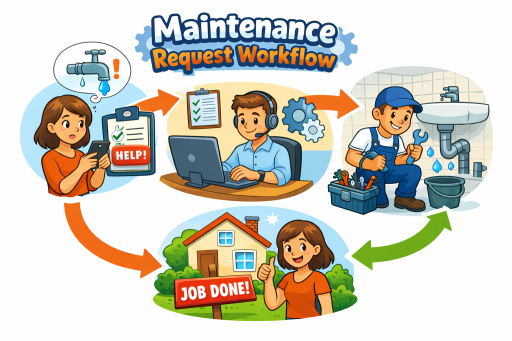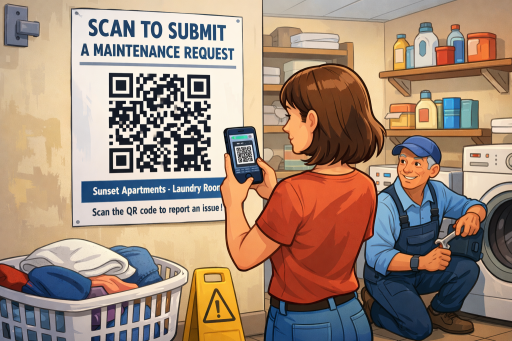
Let residents submit maintenance requests in seconds—just scan, describe, and submit. TaskEstate turns a simple QR code into a faster, cleaner, and more trackable work order workflow.
Why QR Codes Improve Maintenance Request Intake
Phone calls, emails, and sticky notes create incomplete information, missed details, and extra follow-ups. With TaskEstate’s QR-based request intake, residents can report issues immediately from the exact location (laundry room, lobby, hallways) or for their specific unit—without needing an app.
- Fewer back-and-forth messages: capture the problem, photos, and details upfront.
- Faster triage: route requests to the right property, building, or unit automatically.
- Better documentation: every submission becomes a trackable work order record.
- Less call volume: residents use self-serve reporting with clear instructions.
How It Works
- Post the QR code in common areas (laundry room, mail room, lobby, elevator) or near shared equipment.
- Resident scans using their phone camera—no login friction and no app install.
- Request form opens pre-filled with property context (and unit context if you generate per-unit codes).
- Resident submits details (issue description, priority, optional photos, access notes).
- TaskEstate creates a work order and routes it to your team or vendors for fast resolution.
Best Places to Post Resident QR Codes
QR codes work best where residents already notice issues or where shared assets often need attention. Common placements include:
Laundry Room
Report washer/dryer problems, leaks, electrical issues, and safety hazards on the spot.
Lobby & Hallways
Lighting outages, door hardware, elevator issues, and cleanliness concerns.
Mail Room
Broken mailbox locks, access issues, camera or entry system problems.
Fitness Center / Pool Area
Equipment issues, gate latches, signage needs, and safety-related repairs.
Property-Level vs Unit-Level QR Codes
TaskEstate supports two practical approaches depending on how you operate:
- Property-level QR code: one code for a shared area or property. Residents select the unit (or “common area”) inside the form. Ideal for quick deployment.
- Unit-level QR codes: a unique code per unit. The form opens already tied to the unit, reducing mistakes and speeding up triage. Ideal for larger portfolios or high request volume.
Cleaner Data, Faster Closeout
When requests arrive with the right context (property, building, unit, location), your team can respond faster. QR intake helps standardize incoming requests so you can:
- prioritize emergencies and time-sensitive repairs,
- reduce duplicate tickets for the same issue,
- assign the right vendor or in-house technician immediately,
- track turnaround time and closeout performance consistently.
Security & Abuse Prevention
QR codes are powerful because they’re simple—but you still want control. TaskEstate can use secure, signed links so residents can’t alter unit information by editing the URL. This helps protect data integrity and keeps requests tied to the correct location.
- Open your phone camera (or QR scanner).
- Point it at this QR code and tap the link.
- Describe the issue (add photos if possible).
- Enter your unit (if prompted) and contact info.
- Tap Submit — you’ll receive a confirmation.
FAQ
Ready to simplify maintenance requests?
Add QR-based resident intake to your workflow and turn every issue report into a trackable, assignable work order—without the chaos.