Property maintenance operations succeed or fail on one thing: executing work consistently, quickly, and with full visibility. The work order lifecycle is the operational backbone that turns a resident-reported issue into a documented, completed repair—while controlling cost, meeting service levels, and maintaining resident satisfaction.
In this guide, you will learn:
What the work order lifecycle is (and why it differs from a simple “request”)
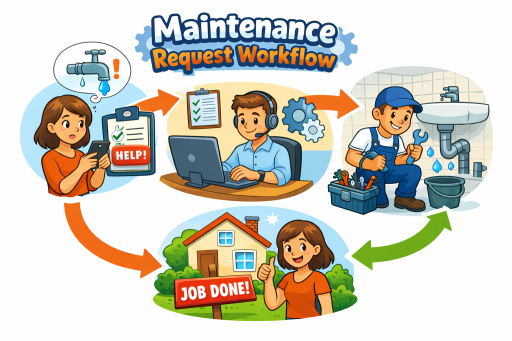
The end-to-end workflow, including owners and handoffs at each stage
Where the lifecycle commonly breaks—and the real costs of those breakdowns
Which KPIs to track to improve speed, quality, and budget outcomes
How a property operations platform supports every step
A 30-day implementation checklist to standardize the lifecycle across properties
What a “work order lifecycle” means in property maintenance
A work order lifecycle is the complete sequence of steps used to intake, authorize, assign, execute, verify, and close maintenance work—along with the data captured at each stage.
In property maintenance, the lifecycle matters because work is:
Multi-stakeholder (resident, property manager, maintenance staff, inspectors, sometimes vendors)
Time-sensitive (emergencies, resident access windows, SLAs)
Audit-relevant (cost controls, approvals, liability, compliance, owner reporting)
Operationally repetitive (hundreds or thousands of similar issues across units)
When the lifecycle is standardized, maintenance becomes predictable: fewer escalations, better first-time fix rates, lower backlog, and cleaner reporting for management and ownership.
Step-by-step lifecycle (with owners and handoffs)
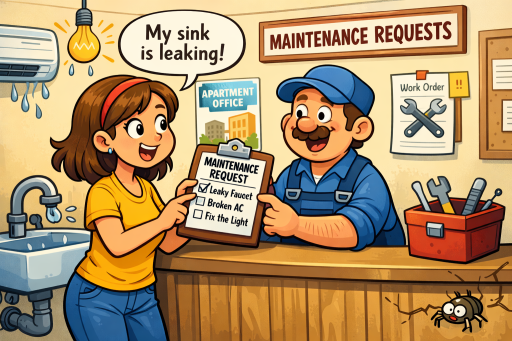
1. Resident submits a request
Owner: Resident (or front office on the resident’s behalf)
The lifecycle begins with a resident maintenance request. The quality of this submission heavily determines how fast the job gets completed.
Best practices at this step
Collect structured data: issue category, location, urgency, description prompts, photos, and access notes.
Allow residents to specify preferred access windows and entry permissions.
Reduce ambiguity with guided forms (examples: “leak under sink” vs. “plumbing problem”).
Outcome: A logged request with enough detail to triage accurately.
Internal link: route users to the resident-facing workflow that leads into your Work Order Management process: /work-order-management.
2. Triage and categorization
Owner: Property manager or maintenance coordinator
Triage converts a request into actionable work by classifying and prioritizing it.
Best practices at this step
Confirm location (unit vs common area) and system (HVAC/plumbing/electrical/appliance).
Apply a consistent priority framework (emergency, urgent, routine).
Flag likely repeat issues or related open work orders to prevent duplication.
Identify whether access constraints require scheduling coordination.
Outcome: A prioritized, categorized item ready for approval or assignment—ideally with standardized tags that drive reporting later.
3. Manager review and approval
Owner: Property manager (or regional manager, depending on thresholds)
Approval ensures cost control and policy compliance—especially when materials, overtime, vendors, or capital expense are involved.
Best practices at this step
Use approval thresholds (e.g., auto-approve under $X; manager approval above $X).
Require minimum documentation for approval: scope, photos, estimated labor/materials, vendor quotes if needed.
Apply segregation of duties where appropriate (the approver should not be the same person closing out high-cost work).
Outcome: An authorized work order with clear scope and constraints (budget, deadline, vendor/in-house decision).
4. Assignment and dispatch
Owner: Maintenance supervisor/coordinator
Dispatch is where execution velocity is won or lost. Assignments must be accurate (skills match) and efficient (routing and workload).
Best practices at this step
Assign by skill, property/building, availability, and on-call rotation.
Batch work by location to reduce travel time and context switching.
Include all job-critical info in the work order: access instructions, photos, unit history, and parts notes.
Use mobile workflows so technicians can execute without returning to the office.
Outcome: A scheduled, assigned work order delivered to the technician.
Internal link: dispatch execution ties directly to /dispatch-mobile.
5. In-progress updates and communication
Owner: Maintenance technician (status updates) + property manager (resident comms oversight)
This stage prevents the most common operational failure: resident uncertainty and internal visibility gaps.
Best practices at this step
Standardize statuses (e.g., Scheduled → In Progress → Waiting on Parts → Completed).
Trigger automated resident updates at key events (scheduled, technician en route, delayed, completed).
Capture reasons for delays (parts, access, vendor scheduling) as structured fields—not only free text.
Outcome: Real-time visibility for management, and fewer resident follow-ups.
Internal link: status transparency is addressed in /status-tracking.
6. Completion, documentation, and resident confirmation
Owner: Maintenance technician; resident confirmation where applicable
Closing the work is not just “done”—it’s “done and provable.” Documentation protects the property and improves future troubleshooting.
Best practices at this step
Require “close-out minimums”: resolution notes, labor time, materials used, and before/after photos when relevant.
Record asset/service details if tied to an appliance or building system (supports warranty and lifecycle planning).
Confirm resident satisfaction or confirm issue resolution, especially for repeat or high-severity issues.
Outcome: Completed work with sufficient documentation to support reporting, audits, and repeat-issue prevention.
7. Close-out, reporting, and learnings
Owner: Property manager/operations leadership
Close-out is where organizations extract value from maintenance data.
Best practices at this step
Code costs accurately (labor, materials, vendor) and classify appropriately (expense vs capital, if applicable).
Track repeat work orders by unit and category to identify systemic issues.
Use reporting to adjust staffing, preventive maintenance, and vendor strategy.
Outcome: A closed work order that improves the next one—via insights, not guesswork.
Where lifecycle breaks (and what it costs)
Lifecycle breakdowns create measurable operational and financial drag. The most common failure points include:
Poor intake quality: vague requests lead to extra site visits, incorrect parts, and longer cycle times.
Inconsistent triage: emergencies treated as routine (or vice versa) increase risk and resident dissatisfaction.
Approval bottlenecks: slow approvals delay work and increase escalation volume.
Bad dispatch decisions: skill mismatch reduces first-time fix rate and increases labor cost.
Weak status visibility: residents call the office; managers interrupt technicians; priorities get reshuffled midstream.
Insufficient close-out documentation: repeat issues rise, warranty claims fail, and reporting becomes unreliable.
What it costs
Higher labor hours per work order
More repeat visits and rework
Increased backlog and SLA breaches
Lower resident satisfaction and retention risk
Poor budget forecasting and reduced owner confidence
Lifecycle KPIs to track (MTTR, SLA, first-time fix, cost/WO)
To improve the lifecycle, measure it. The following KPIs are the most actionable for property maintenance operations:
MTTR (Mean Time to Repair): Average time from work order creation to completion.
Use to identify process delays and staffing gaps.SLA Compliance Rate: Percentage of work orders completed within defined time targets by priority.
Use to enforce service standards and reduce escalations.First-Time Fix Rate: Percentage of work orders resolved without repeat visits for the same issue.
Use to improve diagnostics, intake quality, and technician enablement.Cost per Work Order (cost/WO): Total cost (labor + materials + vendors) divided by number of work orders.
Use to detect outliers by property, category, building, or unit.
Additional metrics that pair well with the above:
Backlog volume and aging by priority
No-access rate
Repeat issues by unit/category
Technician utilization (balanced with quality metrics)
How a property operations platform supports every step
A property operations platform reduces friction at each handoff and ensures the lifecycle is both executable and measurable.
Structured request intake: guided resident submissions improve triage quality.
Workflow automation: standardized statuses, escalations, and approval routing reduce delays.
Role-based visibility: managers, technicians, inspectors, and residents see only what they need, when they need it.
Mobile execution: technicians receive complete work orders, update status in real time, and capture documentation on-site.
Reporting and dashboards: lifecycle KPIs and trends become visible at unit, property, and portfolio levels.
Audit-ready data: approvals, changes, and close-out documentation are traceable.
If your objective is to improve speed and control cost simultaneously, lifecycle standardization plus platform enforcement is the most direct path.
Checklist: what to implement in your first 30 days
Use this 30-day plan to standardize the work order lifecycle quickly without disrupting ongoing operations.
Week 1: Define your lifecycle and data standards
Standardize work order statuses (and what each status requires)
Define priority levels and SLA targets
Create request categories and tagging rules
Set close-out documentation minimums (notes, labor, materials, photos)
Week 2: Implement approvals and controls
Configure approval thresholds (auto-approve vs manager approval)
Define vendor vs in-house decision rules
Establish escalation rules for SLA breaches and emergencies
Week 3: Improve dispatch and execution
Set assignment rules by skill, property/building, and availability
Launch technician mobile workflows for status updates and documentation
Create templates for common issues (HVAC, plumbing, electrical, appliances)
Week 4: Turn on reporting and continuous improvement
Publish dashboards for MTTR, SLA compliance, first-time fix rate, and cost/WO
Review backlog aging weekly (by property and priority)
Identify top repeat issues and implement corrective actions (training, PM, asset replacement)
FAQ
What is the difference between a maintenance request and a work order?
A maintenance request is the initial report of an issue (often submitted by a resident). A work order is the operational record that defines the authorized scope of work, assignment, execution steps, and close-out documentation.
What should be included in a work order for apartments?
At minimum: category, priority, exact location (unit/common area), problem description, photos, access instructions, assigned technician, target due date/SLA, and close-out fields (resolution notes, labor time, materials, and supporting photos when relevant).
How long should a typical work order take to complete?
It depends on priority and category, but best practice is to define SLA targets by severity (e.g., emergencies same-day, urgent within 24–48 hours, routine within several days). Tracking MTTR by category and property helps set realistic standards and staffing.
What metrics matter most for maintenance operations?
MTTR, SLA compliance, first-time fix rate, and cost per work order are the most actionable core metrics. Add backlog aging, repeat issues, and no-access rate for deeper operational control.