Property maintenance teams are measured on response time and completion, but the real driver of long-term performance is asset lifecycle discipline. When asset history lives in spreadsheets, vendor emails, and institutional memory, teams repeat diagnostics, miss replacement windows, and spend more over time. Asset lifecycle management brings structure to that reality: what was installed, where it is, how it has performed, and when it should be repaired, maintained, or replaced.
Why Asset Lifecycle Management Matters for Property Operations
“Maintenance” is often treated as a queue of requests. Asset lifecycle management treats maintenance as a portfolio strategy. Instead of solving the same failures repeatedly, teams build a feedback loop that turns daily work into decision-grade data. The operational benefits are direct:
- Fewer repeat repairs by linking recurring issues to specific assets and locations
- Faster troubleshooting through accessible installation and work history
- Better budgeting by forecasting replacements with evidence, not assumptions
- Higher resident satisfaction as downtime and recurring failures decline
- Stronger accountability with a consistent record of actions, outcomes, and verification
For property managers, the key objective is simple: replace fragmented workflows with a single operational system that connects requests, work execution, inspections, and analytics. A unified platform approach is the foundation for asset lifecycle maturity.
If you are centralizing maintenance operations, start with a system designed to manage the full workflow end-to-end: property maintenance software.
The Asset Lifecycle Framework: Install → Operate → Maintain → Replace
A practical lifecycle model does not require complex tooling. It requires consistent records and a repeatable workflow. In property operations, most asset management programs fail because data is incomplete or disconnected from daily maintenance. The framework below keeps it operational:
- Install: capture what was installed, where, when, and by whom
- Operate: tie work history to the asset and the location it serves
- Maintain: use inspections and planned tasks to prevent failure
- Replace: decide repair vs replace using evidence (cost, downtime, repeat incidents)
The rest of this article explains how to implement this in a way that fits real property maintenance teams—without adding administrative overhead.
Step 1: Capture Installation Records That Actually Get Used
Installation data is only useful if it is accessible at the moment decisions are made. Teams need to see what was installed and when—especially for high-impact assets such as HVAC components, water heaters, appliances, pumps, access hardware, and life-safety systems.
The goal is not “perfect data.” The goal is “decision-enabling data.” At minimum, record:
- Asset type and identifier (model/serial when available)
- Installation date and installer/vendor
- Exact location (property, building, unit, or common area)
- Warranty or service notes (if applicable)
This is where structured installation history becomes operational leverage. If you want a dedicated record system that supports lifecycle decisions, use asset installation records to build continuity as portfolios grow and staff changes occur.
Step 2: Tie Work History to the Asset Through Standardized Work Orders
Installation records are the baseline. Work history is what turns a baseline into a lifecycle decision. The most common failure mode in property maintenance is repeating the same repair without learning. That happens when work is tracked informally and does not accumulate into a searchable, analyzable record.
Standardized work orders are the operational backbone for asset history because they capture: what happened, who did it, when it occurred, and what the outcome was. If your portfolio still relies on scattered communications, implement a controlled workflow with work order management software so recurring issues become visible patterns rather than recurring surprises.
Over time, work order history answers the questions property managers actually need:
- How often has this asset failed in the last 6–12 months?
- Are failures concentrated in a particular building, unit type, or vendor install batch?
- Are we spending more on recurring repairs than a replacement would cost?
- Is downtime or resident impact escalating?
Step 3: Use Inspections to Verify Quality and Prevent Repeat Failures
Asset lifecycle management is not only about “what broke.” It is also about “was it resolved correctly.” Inspections create a quality-control mechanism that reduces repeat tickets and supports compliance-driven assets. They also document outcomes so the asset record reflects reality, not assumptions.
A practical approach is to inspect selectively: high-risk work, recurring failures, and assets with compliance or safety implications. To operationalize that loop, connect verification workflows through property inspection software.
This supports your adjacency principle in practice: work orders drive execution, inspections verify outcomes, and the results can be measured and improved over time.
Step 4: Convert Portfolio Data Into Decisions With Reporting and Analytics
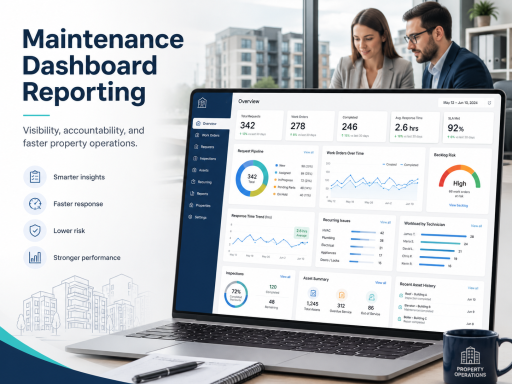
Asset lifecycle management becomes financially meaningful when you can quantify performance: repeat incidents, response time impact, completion trends, and cost drivers. Reporting translates daily work into actionable insights—by asset type, by property, and by location.
For property managers, the most valuable reporting outputs typically include:
- Recurring issues by unit, building, and property
- High-volume asset types driving repeat work
- Backlog trends and aging work orders tied to asset categories
- Inspection outcomes and follow-up rates
This is where the “Work Orders ↔ Reporting ↔ Inspections” loop becomes measurable. Implement portfolio analytics using maintenance dashboards and reporting so lifecycle planning is grounded in data instead of anecdotal experience.
Step 5: Make Location Context Non-Negotiable
Asset decisions are rarely just about the asset. They are about where the asset is and what it impacts. Without consistent portfolio structure—properties, buildings, units—work history becomes ambiguous and reporting becomes unreliable. Location context is the foundation of the “Properties/Units ↔ Assets ↔ Reporting” model.
If you want reporting that reliably identifies patterns by location, ensure assets and work are tied to a structured hierarchy using property, building and unit management. That structure increases operational speed (less searching, fewer errors) and improves the quality of portfolio analytics.
Step 6: Control Access and Accountability With Role-Based Operations
Asset lifecycle programs often stall because responsibilities are unclear: who can approve replacements, who can edit asset records, who can close work, and who verifies outcomes. Role clarity is essential to scale operations across multiple properties without losing governance.
Align responsibilities and permissions using user and role management, so the right teams can execute quickly while leadership maintains appropriate control over approvals, records, and reporting.
Operational Playbook: Repair vs Replace Using Evidence
A disciplined repair-vs-replace decision does not require perfect cost accounting. It requires a consistent decision rule and the supporting data to apply it. Use the following approach:
- Confirm recurrence: identify repeat failures over a defined period (e.g., 90–180 days)
- Quantify impact: measure downtime, resident disruption, and staff time per incident
- Review inspection outcomes: verify whether the issue is resolved or continuing
- Check lifecycle context: installation date, warranty status, and historical performance
- Decide and document: replace when repeat work exceeds a practical threshold of cost or impact
The value of a centralized platform is that these inputs are already connected: work orders capture execution, inspections verify quality, installation records provide context, and reporting quantifies patterns.
Improve Resident Outcomes by Improving Maintenance Inputs
Asset lifecycle management ultimately shows up in resident experience. Faster resolution, fewer repeat issues, and less downtime are outcomes of better intake and better execution discipline. If your intake is inconsistent, lifecycle analysis becomes noisy because problems are not categorized reliably.
Standardized intake supports cleaner data and faster action through the resident maintenance requests portal, which helps ensure work starts with the right details and ends with a reliable operational record.
Next Step: Implement Lifecycle Management Without Adding Complexity
The fastest path to asset lifecycle maturity is not a standalone asset tool—it is a connected workflow that turns daily maintenance into portfolio intelligence. If you are evaluating an operational rollout, start by standardizing the maintenance system of record, then extend into inspections, asset history, and analytics.
To review plans and choose the right rollout for your portfolio, visit TaskEstate pricing.
FAQ
What is asset lifecycle management in property maintenance?
Asset lifecycle management is a structured approach to tracking assets from installation through operation, maintenance, and replacement. It connects installation history, work orders, inspections, and reporting so property managers can reduce repeat repairs and plan replacements with evidence.
What data should be captured in installation records?
At minimum: asset type, location, installation date, installer/vendor, and identifying information such as model or serial when available. The goal is to make troubleshooting and replacement planning faster and more consistent.
How do work orders support lifecycle decisions?
Work orders capture the operational history of an asset—failures, fixes, and outcomes—creating a record that reveals recurrence patterns and supports repair-vs-replace decisions.
How do inspections reduce repeat maintenance?
Inspections verify quality, document outcomes, and trigger follow-up actions when needed. This reduces rework and strengthens compliance for assets where verification is required.
What reporting is most useful for lifecycle planning?
Recurring issues by unit/building/property, high-volume asset types, backlog and aging trends, and inspection follow-up rates are typically the most actionable signals for lifecycle planning.