Property maintenance performance depends on workflow clarity. When everyone can do everything—or when permissions are inconsistent—work orders stall, approvals become unclear, inspections lose independence, and reporting becomes unreliable. A role-based permissions matrix (RBAC matrix) solves this by mapping responsibilities to the exact actions users can take, across the exact properties they should see.
This article provides a practical permissions model you can implement immediately. It is designed to support a centralized operations workflow that replaces emails, spreadsheets, and phone calls with a single system of record for maintenance and operations.
Why a Permissions Matrix Matters in Property Operations
Property teams typically have multiple stakeholders operating in parallel: property managers, maintenance staff, inspectors, and administrators. Without a structured permissions model, common issues appear quickly:
- Approval ambiguity: work is delayed while staff wait for sign-off, or completed without proper authorization.
- Accountability gaps: ownership is unclear for assignment, completion, and verification.
- Data overexposure: users see sensitive information or irrelevant properties, increasing risk and confusion.
- Reporting inaccuracies: inconsistent processes lead to inconsistent data, undermining performance management.
A well-designed permissions matrix supports faster response time and higher confidence, while preserving governance. It also scales cleanly when you add properties, buildings, and staff.
Core Roles in a Property Maintenance Organization
While every organization has nuances, most portfolios can cover 95% of needs with a small set of standardized roles:
- Administrator: manages configuration, security, user access, and portfolio structure.
- Property Manager: governs approvals, prioritization, and operational oversight.
- Maintenance Supervisor (or Lead): controls dispatch, scheduling, and work quality standards.
- Maintenance Technician: executes work, logs progress, and documents completion.
- Inspector: performs inspections and records outcomes independently of execution.
- Resident (portal user): submits maintenance requests with required details.
The objective is not to create a complex hierarchy; it is to define clear authority and a reliable audit trail that supports daily execution.
The Practical Permissions Matrix
Use the matrix below as a baseline. It aligns to the maintenance lifecycle: request intake → review/approval → assignment → execution → verification → reporting. You can further scope access by property, building, and unit depending on responsibility and geography.
| Action / Capability | Administrator | Property Manager | Maintenance Supervisor | Maintenance Technician | Inspector | Resident |
|---|---|---|---|---|---|---|
| Create maintenance request | ✓ (on behalf) | ✓ | ✓ | ✓ (internal) | ✓ (follow-up) | ✓ |
| Review & approve requests | ✓ (override) | ✓ | ✓ (optional) | — | — | — |
| Assign / dispatch work orders | ✓ (override) | ✓ | ✓ | — | — | — |
| Update work status & add notes | ✓ | ✓ | ✓ | ✓ | ✓ (inspection notes) | — |
| Close work orders | ✓ | ✓ | ✓ | ✓ (with rules) | — | — |
| Create inspection records | ✓ (override) | ✓ (view) | ✓ (view) | — | ✓ | — |
| Trigger follow-up work from inspections | ✓ | ✓ | ✓ | — | ✓ | — |
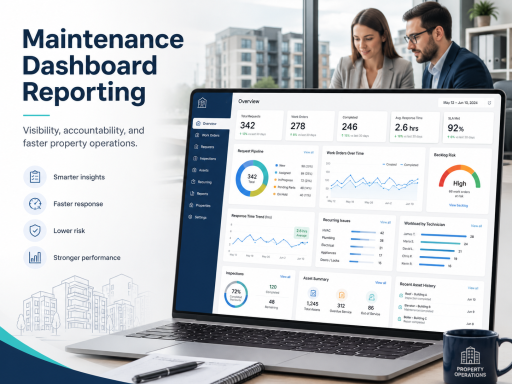
| View dashboards & performance reports | ✓ | ✓ | ✓ | ✓ (limited) | ✓ (limited) | — |
| Manage properties / buildings / units | ✓ | ✓ (scoped) | — | — | — | — |
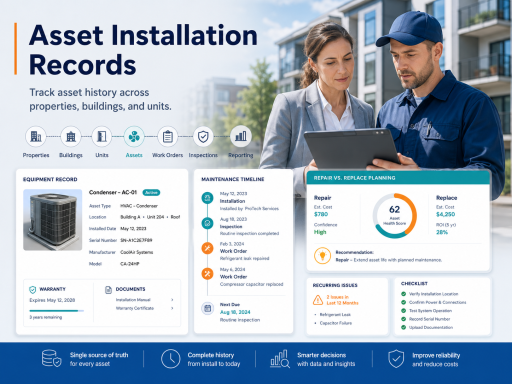
| Manage asset installation records | ✓ | ✓ (scoped) | ✓ | ✓ (limited) | ✓ (view) | — |
| Manage users & role permissions | ✓ | — | — | — | — | — |
Implementation note: keep “override” permissions rare and auditable. Overrides should exist to prevent operational dead ends, not to replace normal workflows.
Scope Permissions by Portfolio, Not Just Role
A role alone is not sufficient; scope matters. A property manager may need full control for their assigned properties but should not automatically gain access to every site in the portfolio. The most reliable model is Role + Scope:
- Role defines what actions the user can take (approve, assign, close, report).
- Scope defines where they can take those actions (specific properties, buildings, units).
This prevents noise, reduces mistakes, and improves day-to-day speed. Portfolio structure is foundational to this approach, which is why access control should align with property, building, and unit management.
Work Orders ↔ Reporting ↔ Inspections: Preserve Separation of Duties
Your permissions model should explicitly support a closed loop without compromising independence:
- Work orders: execution is owned by maintenance roles, with manager oversight where needed.
- Inspections: verification is best performed by an inspector role that is distinct from the executing technician.
- Reporting: performance visibility should be accessible to decision-makers without granting them unnecessary editing powers.
This separation of duties improves quality, reduces repeat work, and strengthens your audit trail. The operational loop is supported by work order management, maintenance dashboards and reporting, and property inspections.
Properties/Units ↔ Assets ↔ Reporting: Use History to Improve Decisions
Permissions should also protect asset integrity. Asset records influence repair-versus-replace decisions and support lifecycle planning. However, uncontrolled editing of asset history can reduce trust in reporting outcomes. A practical approach is:
- Admins set standards and governance for asset record structure.
- Managers and supervisors can add and maintain asset history within scope.
- Technicians can contribute operational notes and relevant updates, with controlled fields.
- Inspectors can reference asset context while maintaining independent inspection records.
When asset history is maintained properly, reporting becomes more actionable: recurring issues can be tied to specific asset types and installation timing. This lifecycle context is supported by asset installation records.
Resident Experience: Give Access Without Operational Risk
Resident users should have a narrow, purposeful permission set: submit requests with required details, and potentially view basic status (where applicable). The resident role should not be able to access internal notes, staff assignments, inspection outcomes, or portfolio reporting.
A controlled resident permission set improves intake quality while protecting operational data. This model is enabled through the resident maintenance requests portal.
Common Pitfalls and How to Avoid Them
- Too many roles: start with 5–7 roles. Add new roles only when there is a real separation-of-duties need.
- Global access by default: make portfolio scope explicit. Role-based permissions without scope leads to overexposure.
- Technicians forced to “admin” actions: keep execution roles focused on execution, with clear boundaries for approvals and configuration.
- Inspection permissions mixed into execution: preserve independence so inspection outcomes remain credible.
- Reporting without governance: ensure data creation and editing permissions support reliable metrics.
How to Implement RBAC in TaskEstate
A role and permissions strategy is most effective when it is part of an end-to-end operations platform. If your goal is to replace emails, spreadsheets, and phone calls, implement access control as part of a unified maintenance workflow using property maintenance software and role controls through user and role management.
For organizations evaluating rollout scope and adoption, review plan options and deployment fit on the pricing page.
FAQ
What is a role-based permissions matrix?
A role-based permissions matrix is a structured mapping of user roles (e.g., property manager, technician, inspector) to system actions (approve, assign, close, report), often combined with portfolio scope (which properties or units they can access). It reduces ambiguity, improves accountability, and strengthens auditability.
Should inspectors have different permissions than maintenance technicians?
Yes. Separating inspection permissions from execution supports independent verification and reduces repeat work. Inspectors should be able to record findings and trigger follow-up actions without needing access to dispatch or assignment controls.
How do I prevent permission complexity as my portfolio grows?
Use a small number of standardized roles, apply role + scope consistently, and avoid property-specific “custom roles” unless there is a documented compliance or governance reason. Keep overrides limited and auditable.
What permissions should residents have?
Residents should typically be limited to submitting maintenance requests and providing details needed for triage. Internal notes, assignments, inspections, and reporting should remain restricted to operational roles.