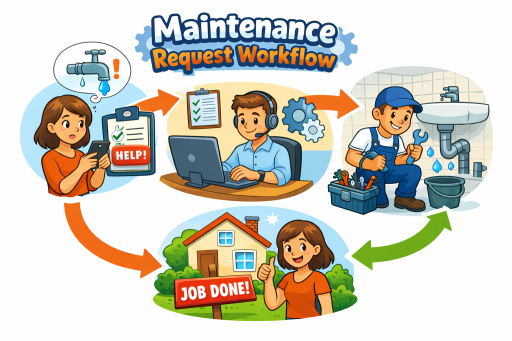
Maintenance communication is where property operations quietly lose time. Not because teams do not care, but because the channel mix is chaotic: emails for approvals, texts for access, phone calls for escalations, spreadsheets for tracking, and hallway conversations for “quick updates.” The result is predictable—status-chasing, duplicated work, delayed approvals, and residents who feel ignored even when the team is working hard.
The fix is not “send more messages.” The fix is to make communication operational: standardize what must be consistent, and automate what should never be manual. In practice, that means replacing ad hoc coordination with a centralized workflow built on structured requests, standardized statuses, clear ownership, and reporting you can trust. A platform approach such as property maintenance software provides the system of record needed to support that operating model.
Why Maintenance Communication Breaks Down
Most communication failures in maintenance are structural, not personal. They typically come from four root causes:
- Unstructured intake: requests arrive without the details needed to triage, approve, and assign quickly.
- Unclear ownership: it is not obvious who must approve, who is assigned, or who is responsible for follow-up.
- Inconsistent status language: “In progress” can mean anything, which forces managers to call or message to clarify.
- No feedback loop: inspection outcomes, repeat issues, and performance trends are not captured in a measurable way.
These issues compound in portfolios. The larger the team and the more sites you manage, the more you need consistent definitions and reliable workflows. That is where standardization and automation become operational necessities rather than “nice to have.”
What to Standardize: The Communication That Must Be Consistent
Standardization reduces decisions that do not need to be remade. It makes every message more meaningful because the underlying workflow is consistent. The goal is to define a small set of standards that everyone uses, everywhere.
1) Request Intake Requirements
The quality of communication downstream depends on the quality of intake upstream. Standardize the minimum information needed to triage and route work:
- Issue category (plumbing, electrical, HVAC, appliances, pests, general)
- Location (property, building, unit)
- Priority (emergency, urgent, routine) with clear definitions
- Access instructions and preferred contact method
- Photos or notes where helpful
A structured intake flow—supported through a resident maintenance requests portal—reduces clarification messages, accelerates triage, and improves first-visit resolution because technicians arrive with context.
2) Approval Rules and Decision Ownership
Approvals are one of the most common communication bottlenecks. Standardize who can approve what, and under which conditions. Examples:
- Auto-approve routine requests under a defined scope
- Manager approval required for high-cost, high-risk, or vendor work
- Escalation paths when approvals are pending beyond a set threshold
When approvals are explicit, messages become targeted and actionable rather than open-ended. This aligns naturally with a centralized work order management process where requests move through review and assignment without being buried in inboxes.
3) Status Definitions That Replace “What’s the Update?”
Status-chasing happens when status language is vague. Standardize a small set of statuses with operational meaning. A practical model might include:
- New: received, not yet reviewed
- Under Review: awaiting manager decision or clarification
- Approved: authorized to schedule/assign
- Assigned: owned by a specific technician/vendor
- Scheduled: date/time planned (if applicable)
- In Progress: work started
- Blocked: access/parts/vendor dependency
- Completed: work finished, pending verification (if needed)
- Closed: verified and fully documented
These definitions reduce ambiguity, improve internal alignment, and create consistent operational records for reporting.
4) Closeout Notes and Completion Standards
Closeout documentation is communication that protects the future. Standardize what must be recorded at completion:
- What was done (plain language summary)
- Parts used or key steps taken
- Anything still pending (if partially resolved)
- Recommendations (repair vs replace, follow-up needed)
When closeout standards are consistent, your team stops re-diagnosing the same issues, and managers can answer resident questions without making phone calls.
5) Portfolio Structure as a Communication Backbone
Communication becomes noisy when location context is unreliable. Standardize how your portfolio is represented so every request and work order is tied to the correct place. That is why operational structure matters: property, building, and unit management ensures that history, responsibility, and reporting stay accurate across sites.
What to Automate: The Communication That Should Never Be Manual
Automation does not mean spamming residents or staff. It means removing repetitive manual steps that consume time and create inconsistency. The best automation is event-driven: when the workflow changes, the right people are informed in a consistent way.
1) Immediate Acknowledgment of Receipt
Residents want to know their request did not vanish. Automate a confirmation that the request was received and queued for review. This single step reduces follow-up calls and sets expectations.
2) Approval Outcomes and Next Steps
When a request is approved or requires clarification, automate the internal notification to the correct owner. For residents, share only what is appropriate (e.g., “approved and scheduled,” or “additional info needed”). This prevents stalled work caused by invisible decision points.
3) Assignment Notifications That Include Context
Once work is assigned, staff should receive an actionable work order, not a vague message. Automation should deliver assignment details with location, priority, and notes so the technician can execute without additional back-and-forth.
4) Status Update Messages Triggered by Workflow Events
Automate updates at high-signal moments, such as:
- Scheduled
- Blocked (with reason)
- Completed
- Closed
This replaces ad hoc “checking in” messages with consistent, meaningful updates that align to standardized statuses.
5) Inspection Results and Follow-Up Actions
When quality verification is required, automation should ensure the outcome is captured and follow-up work is created when needed. This is where communication and compliance intersect. Connecting inspections to the workflow—through property inspection software—helps teams document outcomes and prevent repeated issues from bouncing back into the queue.
Work Orders ↔ Reporting ↔ Inspections: The Communication Feedback Loop
Communication becomes operationally valuable when it creates measurable data. Work orders are the execution record. Inspections validate outcomes. Reporting turns activity into performance management. Together, they form a loop:
- Work orders capture what happened and who owns it.
- Inspections validate quality and trigger follow-ups.
- Reporting reveals bottlenecks, repeats, and service levels.
This is why maintenance communication should be designed to feed metrics, not just messages. Use maintenance dashboards and reporting to monitor response time, completion time, backlog aging, repeat incidents, and workload distribution—then adjust standards and automations based on what the data shows.
Properties/Units ↔ Assets ↔ Reporting: Communicate With Lifecycle Context
Recurring maintenance problems are often asset problems. Without asset context, teams repeatedly diagnose the same equipment and struggle to make repair-versus-replace decisions. Communication improves when it includes lifecycle history: what was installed, when, and where.
That context is supported through asset installation records, which help teams understand the background behind repeat incidents. When those records feed reporting, managers can identify patterns (by unit, building, or asset) and make proactive decisions rather than reacting to the next complaint.
Security, Users, and Permissions: Prevent Communication Chaos at Scale
As teams grow, “who can see what” becomes a communication issue. If everyone has access to everything, information overload and risk increase. If access is too limited, work stalls. Role-based control keeps the workflow moving while preserving accountability and governance.
Align permissions to responsibilities using user and role management so approvals, assignments, inspection actions, and reporting visibility match operational roles. This reduces misrouted messages, prevents unauthorized actions, and supports cleaner audit trails.
A Practical Implementation Plan for Property Managers
If you are transitioning away from emails and spreadsheets, implement in phases to reduce disruption:
- Standardize intake: require consistent fields and triage categories.
- Define statuses: adopt a short status list with operational meaning.
- Clarify approvals: set decision ownership and thresholds.
- Automate key events: confirmation, assignment, blocked, completed, closed.
- Close the loop: use inspections for verification where appropriate.
- Measure and improve: use reporting to refine standards and staffing decisions.
This approach replaces “communication as coordination” with “communication as a workflow outcome.” It also makes performance measurable, which is where accountability and response time improve in a durable way.
Next Step
Replace status-chasing with a centralized platform that standardizes the maintenance lifecycle and automates the updates that should never be manual. Review plan options and get started here: TaskEstate pricing.
FAQ
What maintenance communication should be standardized first?
Start with intake requirements and status definitions. These two standards reduce the most back-and-forth and create consistent records for approvals, assignments, and reporting.
What maintenance communication is best to automate?
Automate high-signal workflow events: request received, assigned, scheduled, blocked, completed, and closed. Event-driven updates reduce manual messaging and keep residents and teams aligned.
How do reporting and inspections improve communication?
Reporting shows where communication gaps create delays (e.g., approvals pending, work blocked), while inspections verify outcomes and prevent repeat issues. Together they form a closed loop that improves service levels and accountability over time.