Work order approvals are one of the most misunderstood levers in property maintenance operations. Many teams either approve everything (and slow response time) or approve almost nothing (and lose budget control and auditability). The right approach is a tiered approval model: auto-approve low-risk work, require manager approval for defined thresholds, and use exceptions for compliance and safety.
This article outlines a professional approval framework you can apply across your portfolio, including recommended thresholds, exception rules, and the operational data you should capture for reliable reporting. If your goal is to replace emails, spreadsheets, and phone calls with a centralized workflow, start by standardizing approvals inside a structured work order system such as work order management software.
Why approvals matter (and why they often break operations)
Approvals exist to create control: budget oversight, prioritization, resident impact management, and accountability. But approvals also introduce a decision gate—so if your gate is too strict or too vague, you get stalled work orders, frustrated residents, and noisy escalations.
Most approval failures come from one of these patterns:
- Approval overload: managers must approve routine items that could safely flow through, creating queue delays.
- Approval ambiguity: the team does not know what requires approval, so work either stops or proceeds without oversight.
- Untracked approvals: decisions happen in email or hallway conversations, leaving no audit trail and poor accountability.
- No exception model: emergencies, compliance issues, and repeat failures are handled inconsistently.
A good approval model reduces friction while preserving governance. The objective is not “more approvals.” The objective is faster routine execution and tighter control on high-impact work.
The tiered approval model property managers should use
Use a three-tier structure and apply it consistently across properties:
Tier 1: Auto-approve routine work
Auto-approval is for low-risk, repeatable work where speed matters more than managerial review. Examples include minor plumbing adjustments, simple hardware replacements, non-emergency electrical resets, and standard unit touch-ups. To make auto-approval safe, ensure requests are categorized and include the minimum required data at intake via a structured resident maintenance requests portal.
Tier 2: Manager approval based on thresholds
Manager approval is for work that is likely to impact budget, resident experience, property reputation, or schedule. Approvals should trigger based on clear thresholds (cost, scope, vendor involvement, unit access constraints, or time sensitivity). Thresholds should be measurable and consistent, not subjective.
Tier 3: Mandatory approval and escalation
Mandatory approval is for compliance and safety items, potential liability, repeat failures, or work requiring inspection validation. This tier also includes exceptions such as emergency remediation where rapid action is needed, but documentation must be completed immediately after execution.
Approval rules you can implement immediately
Below is a practical set of approval rules used in high-performing property operations. Adjust the specifics to your portfolio, but keep the structure stable.
Rule 1: Auto-approve low-cost, low-risk work
- Trigger: routine category + low complexity + no vendor
- Best for: quick fixes, minor replacements, resident comfort issues that do not pose safety risk
- Control: require standardized notes and completion evidence (what was done, parts used, outcome)
Rule 2: Require approval when cost exceeds a threshold
- Trigger: estimated cost above your set amount
- Best for: replacements, multi-step repairs, recurring issues that may require parts or vendor support
- Control: require a brief scope summary and recommendation (repair vs replace)
Rule 3: Require approval when work involves a vendor
- Trigger: external vendor assignment
- Best for: HVAC, major electrical, remediation, specialized trades
- Control: require vendor selection rationale, scheduling constraints, and expected completion window
Rule 4: Require approval for repeat issues within a time window
- Trigger: same unit + same category repeated within a defined period
- Best for: leaks, appliance failures, recurring electrical faults, chronic resident complaints
- Control: require deeper diagnosis and review asset history using asset installation records before authorizing another “quick fix”
Rule 5: Mandatory approval for safety and compliance categories
- Trigger: safety risk, code-related work, or compliance-related maintenance
- Best for: life-safety systems, structural concerns, hazardous conditions
- Control: require follow-up validation through property inspections to close the loop
Rule 6: Allow emergency execution with post-approval documentation
Emergencies must move fast. The rule should be: execute immediately, then complete documentation and managerial review afterward. This prevents preventable damage while still preserving governance and an audit trail.
What information must be captured for an approval decision
Approvals become fast and reliable when managers have a consistent dataset. Require these inputs before a “Tier 2” or “Tier 3” approval can be completed:
- Location context: property, building, unit (and any access restrictions)
- Category and priority: standardized list, not free text
- Scope summary: what is broken, what outcome is required
- Estimated cost and parts: even if approximate
- Execution plan: in-house vs vendor, expected timeline
- Risk flags: safety, repeat issue, resident impact, compliance
The easiest way to ensure location accuracy is to anchor work to portfolio structure through property, building, and unit management. When location data is consistent, approvals are quicker and reporting is substantially more useful.
Work Orders ↔ Reporting: measure approval performance (not just maintenance performance)
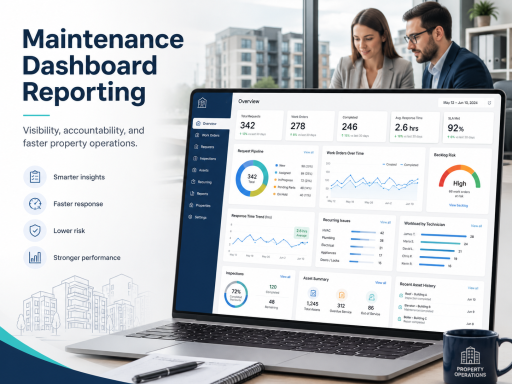
Many teams track maintenance response time but ignore approval time—even though approval delays are often the true bottleneck. Treat approvals as a measurable stage with its own operational KPIs:
- Time to approve: average and percentile by property and category
- Approval queue size: how many items are waiting at any time
- Auto-approval rate: are routine items flowing through as intended?
- Rework rate: approvals that required clarification due to incomplete intake
These metrics should be visible alongside work order performance using maintenance dashboards and reporting. When you can see where time is being spent, you can optimize the process with confidence.
Work Orders ↔ Inspections: use inspections selectively to reduce repeat work
Not every work order needs inspection, but inspection is a powerful control for the right categories: safety issues, repeat incidents, high-cost repairs, and vendor work. The goal is to verify outcomes and prevent repeat tickets that erode resident trust and overload staff.
A clean approach is to define “inspection-required” categories and apply them consistently. This creates predictable quality checks without turning inspections into a bottleneck. Ensure that only the right users can verify and close inspection-related steps by controlling permissions with user and role management.
How to avoid approval bottlenecks without losing control
If approvals are slowing your operation, do not remove approvals blindly. Instead, tighten the rules and reduce decision load:
- Increase auto-approval coverage for truly routine categories.
- Raise data quality at intake so managers approve faster with fewer clarifications.
- Use thresholds (cost, vendor, repeat issue) instead of subjective “manager preference.”
- Standardize categories and priority definitions across the portfolio.
- Track approval time as a KPI and fix systemic delays.
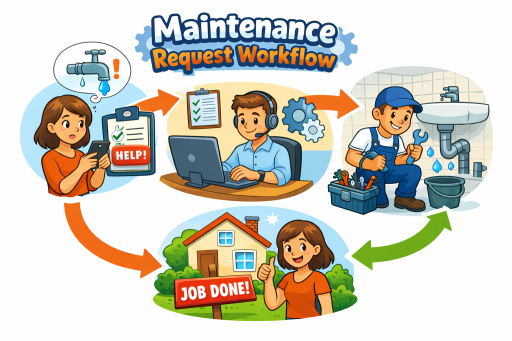
Most importantly, approvals should be part of an end-to-end workflow—intake, review, assignment, tracking, closeout, and reporting—inside a centralized platform such as property maintenance software.
Operational checklist: implement approval rules in one week
- Define 8–15 maintenance categories and map each to a tier (auto-approve, threshold approval, mandatory approval).
- Set threshold triggers (cost, vendor involvement, repeat issue window, safety/compliance flags).
- Define mandatory data fields needed before approval can be completed.
- Implement inspection-required categories and verification responsibility.
- Publish your rules internally and train staff on what “ready for approval” means.
- Track time-to-approve and queue size, then adjust tiers based on results.
Call to action
If you want approvals that protect budgets without slowing response time, align your workflow to a tiered model and measure approval performance like any other operational stage. To evaluate TaskEstate for your portfolio, review plan options on the pricing page.
FAQ
Should every work order require manager approval?
No. Approving everything creates unnecessary delays. A tiered model auto-approves routine work while requiring manager review only when defined thresholds or risk flags are present.
What thresholds are most effective for approval rules?
The most reliable triggers are cost threshold, vendor involvement, repeat issues within a time window, and safety/compliance categories. These triggers are measurable and reduce subjective decision-making.
How do I prevent approvals from becoming a bottleneck?
Increase auto-approval coverage for low-risk work, improve intake data quality, standardize categories, and track time-to-approve with dashboards so delays are visible and fixable.
When should inspections be required after a work order is completed?
Use inspections selectively for safety items, repeat incidents, vendor work, and high-cost repairs. The goal is to verify outcomes and reduce repeat maintenance requests.