Property maintenance performance is often limited by workload imbalance, not lack of effort. One property becomes a “hot spot,” one technician carries the hard jobs, one backlog grows quietly, and response time degrades until residents escalate. Effective workload management is the discipline of converting maintenance demand into predictable capacity decisions—using standardized workflows, clean assignment rules, and portfolio visibility.
This guide outlines a practical system for balancing technicians across multiple properties. The objective is to reduce backlog, improve response time, and increase accountability—without turning your team into spreadsheet managers.
If you are still coordinating work through emails, spreadsheets, and phone calls, start by centralizing the workflow in Property Maintenance Software designed for end-to-end operations, from intake to closeout.
Why Workload Imbalance Happens in Property Maintenance
Workload imbalance typically comes from predictable operational gaps:
- Unstructured demand: requests arrive through multiple channels and are triaged inconsistently.
- Approval bottlenecks: managers hold work “in limbo,” creating hidden queues.
- Unclear assignment rules: technicians receive work based on who is available, not who is best positioned to complete it quickly.
- No shared status standards: the team cannot distinguish “in progress” from “blocked,” so leaders cannot intervene early.
- Limited portfolio visibility: leadership lacks a reliable view of backlog and throughput by property and technician.
Balancing technicians across properties requires one consistent operational language: standardized requests, standardized work orders, standardized statuses, and standardized reporting.
Step 1: Normalize Demand With Structured Intake
Workload management starts at intake. When request details vary widely (or are missing), managers spend time clarifying issues and technicians lose time diagnosing on site. The result is longer cycle time, more repeat visits, and increased workload pressure.
Use a consistent intake flow—one that captures the right information up front and routes it into a review-and-approval process. For resident-submitted maintenance, the fastest path is a structured portal that reduces incomplete requests and supports faster triage. TaskEstate supports this through the Resident Maintenance Requests Portal.
Operational rule: You cannot balance what you cannot compare. Standardize intake fields (issue type, location, urgency, access notes) so work orders can be prioritized consistently across every property.
Step 2: Convert Requests Into Work Orders With Clear Ownership
Workload balance breaks down when “work” exists outside a formal work order. If approvals happen in a thread, or assignments happen verbally, the maintenance pipeline becomes invisible and impossible to manage as a system.
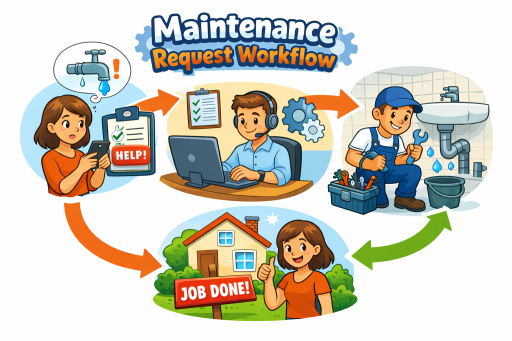
Use a standardized lifecycle—request → review → approval → assignment → completion—so every job has a single owner and a tracked status. This is the operational foundation of Work Order Management Software for Property Maintenance, enabling managers to assign work consistently and technicians to execute with clarity.
Operational rule: If a task is real, it must exist as a work order. Otherwise it will reappear later as backlog, rework, or escalation.
Step 3: Establish Assignment Rules That Prevent “Hot Spots”
Balancing technicians across properties is not simply “spread work evenly.” It is about minimizing total time-to-complete across the portfolio by assigning the right work to the right person at the right time.
Implement assignment rules that consider:
- Skill fit: assign specialized jobs (HVAC, electrical) to appropriately skilled technicians.
- Property proximity: reduce travel time by clustering work geographically when feasible.
- Work type batching: group similar tasks (filters, minor plumbing, fixture replacement) to improve throughput.
- Capacity thresholds: cap active assignments per technician to prevent work from stalling “in progress.”
- Escalation triggers: define when a job moves from “routine” to “at risk” based on age or severity.
To make this work, you need clean location structure. Without a reliable portfolio map (properties, buildings, units), you cannot analyze where demand is concentrated or where staffing should flex. TaskEstate supports location-driven operations through Property, Building & Unit Management.
Step 4: Standardize Statuses to Make Backlog Visible
Workload pressure becomes unmanageable when the team lacks consistent status definitions. “In progress” can mean “actively being worked” or “waiting for parts,” and leadership cannot intervene effectively without clarity.
Adopt simple, standardized statuses that reveal where work is stuck. A practical baseline includes:
- New: received and awaiting review/approval
- Approved: ready to assign
- Assigned: ownership established; scheduled to be worked
- In progress: active work underway
- Blocked: waiting on parts/access/vendor/approval
- Completed: work done pending verification (if required)
- Closed: verified and documented
Operational rule: “Blocked” is a management signal. If blocked work exceeds a threshold, you do not have a technician capacity problem—you have a process constraint problem.
Step 5: Use Reporting to Balance Capacity by Property and Technician
Once intake, work orders, locations, and statuses are standardized, you can manage workload using objective metrics rather than intuition. Reporting should answer three questions:
- Where is demand concentrated? (by property/building/unit)
- Where is capacity constrained? (by technician/team)
- Where is flow breaking down? (approval delays, blocked work, repeat issues)
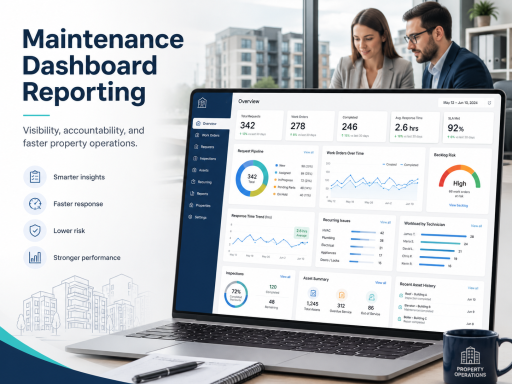
TaskEstate supports portfolio visibility through Maintenance Dashboards & Reporting, enabling property managers to identify bottlenecks early and reallocate workload before response time degrades.
Key workload metrics to monitor weekly:
- Open work orders by property and technician
- Aging work (how long jobs sit in each status)
- Backlog size (open jobs older than your SLA threshold)
- Completion throughput (jobs closed per technician per week)
- Blocked rate (percentage of work orders blocked)
- Repeat work indicators (recurring issues by unit/asset type)
Operational rule: Workload balance is a portfolio metric. A property-level “good week” does not matter if the portfolio is accumulating backlog elsewhere.
Step 6: Work Orders ↔ Reporting ↔ Inspections—Protect Quality While Increasing Throughput
Organizations often try to “fix backlog” by pushing technicians to close more work orders. If quality drops, repeat issues rise and the workload problem gets worse. The solution is a closed loop: work orders drive execution, inspections validate outcomes where appropriate, and reporting measures the system end-to-end.
When inspection verification is required (move-outs, safety checks, recurring issues), route work into a quality loop using Property Inspection Software for Buildings and Units. This supports consistent documentation, reduces rework, and provides evidence of completion standards—especially important when multiple technicians rotate across the same properties.
Operational rule: Throughput without verification produces rework. Rework is hidden workload that quietly destroys response time.
Step 7: Properties/Units ↔ Assets ↔ Reporting—Reduce Repeat Diagnostics
One of the fastest ways to reduce workload pressure is to reduce repeat diagnostics. When technicians spend time rediscovering equipment history, they lose capacity that could be used to close new work. Asset context turns maintenance from “guess and check” into informed execution.
Maintain equipment context through Asset Installation Records, tracking what was installed, where it resides, and when it was installed. When this data is paired with reporting, property managers can identify assets that generate repeat work and plan replacements instead of funding endless repairs.
Operational rule: If the same issue repeats, the “problem” is often not the technician—it is an aging asset, incomplete closeout, or missing verification.
Step 8: Align Responsibility With Role-Based Controls
Workload balance depends on clean ownership. If anyone can assign, close, or modify work orders without structure, accountability blurs and data quality degrades. A role-based model ensures:
- Managers approve and prioritize work
- Maintenance staff execute and update status
- Inspectors validate outcomes and record findings
- Administrators manage configuration and access
To maintain governance at scale, implement role-based permissions using User & Role Management for Property Maintenance Teams. This ensures workload decisions remain consistent and operational data remains trustworthy.
A Practical Weekly Workload Balancing Routine
Workload management becomes effective when it is operationalized as a routine. A simple weekly process for property managers:
- Review backlog by property: identify which locations are accumulating aging work.
- Check blocked work: remove constraints (access, parts, vendor scheduling) before reassigning more labor.
- Rebalance assignments: shift routine work to create space for urgent and aging items.
- Batch similar tasks: reduce travel and setup time for common work types.
- Validate quality signals: use inspections for repeat issues and high-risk categories.
- Communicate priorities: ensure technicians understand what must close this week and why.
Operational rule: Rebalancing is not a one-time cleanup. It is a management system that prevents backlog from forming.
Next Step: Centralize the Workflow and Measure What Matters
Balancing technicians across properties requires more than good intentions. It requires a centralized platform that standardizes intake, approvals, work orders, locations, reporting, and verification—so workload decisions are grounded in real operational data.
If you want to replace manual coordination with one system that improves accountability and response time, review TaskEstate pricing and choose the plan that fits your portfolio operations.
FAQ
What is the most common cause of maintenance workload imbalance?
The most common cause is unstructured demand and unclear ownership—requests arriving through multiple channels, inconsistent approvals, and assignments that are not governed by consistent rules. Standardizing intake and converting all work into tracked work orders resolves the visibility problem first.
How do I balance technicians across multiple properties without increasing travel time?
Use location-aware assignment and batching. Group similar tasks, cluster work geographically when feasible, and use reporting to identify “hot spot” properties where demand consistently exceeds capacity.
How do I reduce backlog without sacrificing quality?
Implement a closed loop: standard work orders for execution, targeted inspections for verification on high-risk or repeat categories, and reporting that measures both throughput and repeat issues. This prevents rework, which is a major hidden driver of backlog.