Work orders fail for predictable reasons: inconsistent request details, unclear priorities, missing location data, and closeouts that say “done” but explain nothing. The fastest way for property managers to improve response time and accountability is to standardize the work order template—so every request becomes an actionable, trackable job with the right information from intake through completion.
This guide explains what to standardize, which fields matter most, and how to structure templates so maintenance teams spend less time clarifying work and more time completing it. It also shows how templates connect to adjacent operational modules—work orders, reporting, and inspections—and how portfolio structure and asset history improve decisions.
Why Standard Templates Improve Response Time and Accountability
In property maintenance, variability is the enemy of throughput. When every technician receives a different style of “ticket,” the team pays a hidden tax: duplicate questions, avoidable site visits, incorrect parts, and unresolved root causes. A standardized work order template reduces that variability by ensuring every request is captured, approved, assigned, and closed using the same operational language.
- Faster triage: consistent categories and priorities make the “next action” obvious.
- Cleaner approvals: managers can approve with confidence because the scope is clear.
- Better execution: technicians arrive with the details they need to complete work on the first visit.
- Reliable history: consistent closeout notes create an audit trail that supports repeat-issue prevention.
- Actionable reporting: structured data produces accurate trends by unit, building, and property.
Template discipline is most effective when it is implemented inside a system designed for maintenance workflows rather than improvised across spreadsheets and email threads. A platform approach like work order management software for property maintenance ensures the template is applied consistently across staff, sites, and time.
Start With the Maintenance Lifecycle You Want to Standardize
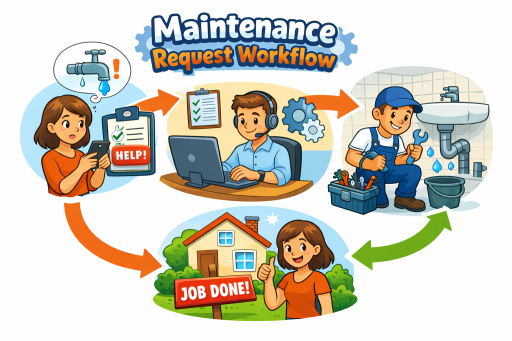
Before you define fields, define the lifecycle you want every work order to follow. The objective is a repeatable sequence that eliminates ambiguity: request → review → approval → assignment → execution → closeout → verification (when needed).
If your intake is inconsistent, templates will not hold. Establish a single request entry path that captures the same baseline details every time. For resident-generated issues, the most scalable approach is a structured intake flow such as a resident maintenance requests portal. For manager-initiated work, apply the same template discipline to internal requests and inspections.
The “Must-Have” Work Order Template Fields
A strong template captures the information needed to (1) decide, (2) schedule, and (3) complete the work. If a field does not support one of those outcomes, remove it. Below is a practical set of must-have fields for most property maintenance operations.
1) Location and access
- Property, building, and unit identifier
- Access instructions (lockbox, key, resident availability rules)
- Area of issue (kitchen, bathroom, HVAC closet, exterior, common area)
Location accuracy is foundational for execution and reporting. When your portfolio structure is standardized, work orders become easier to route and analyze. This is why many operations teams pair templates with a structured location model like property, building & unit management.
2) Problem description and symptoms
- Issue summary (one sentence)
- Detailed description (what is happening, when it occurs, what has changed)
- Severity indicators (leak present, power loss, no heat, safety risk)
3) Priority and due-by expectations
- Priority level (Emergency, Urgent, Routine, Low)
- Target response window (internal SLA guidance)
- Escalation flag (if emergency criteria is met)
4) Work type and category
- Category (Plumbing, Electrical, HVAC, Appliance, Pest, Access, Common Area, Exterior)
- Work type (Repair, Replace, Inspect, Preventive, Vendor)
- Trade assignment (optional, if routing by trade)
5) Ownership and assignment details
- Assigned technician or team
- Requested start date/time window (if applicable)
- Internal watchers (manager, supervisor)
6) Closeout requirements
- Work performed (plain language)
- Parts used / materials (if relevant)
- Root cause notes (when repeat issues occur)
- Follow-up required (yes/no) and reason
Standard Categories and Priority Rules That Actually Work
The goal is not to create a long list of categories; it is to create a short list that makes routing and reporting accurate. Too many categories produce inconsistency. Too few categories hide real patterns. Most portfolios perform well with 8–12 categories and 3–4 priority levels.
A practical priority model is:
- Emergency: safety risk, active flooding, gas smell, no power, security breach.
- Urgent: partial loss of essential service (HVAC outage in extreme weather, refrigerator failure).
- Routine: standard repairs that do not pose immediate risk.
- Low: cosmetic items or enhancements that can be batched.
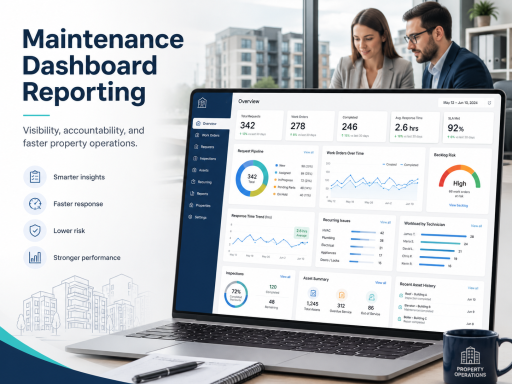
Once categories and priorities are standardized, you can analyze performance reliably and identify bottlenecks. This is where operational visibility becomes decisive: dashboards and trend reporting are only as good as the consistency of your underlying work order data. A reporting layer such as maintenance dashboards & reporting is most effective when categories, priorities, and statuses are applied the same way across the portfolio.
Status Standards: The Minimum Set You Should Enforce
Many teams overcomplicate statuses. The right approach is to establish a small set of statuses that clearly reflect progress and blockers. A practical standard:
- New: submitted and awaiting review
- Approved: authorized and ready for assignment
- Assigned: owner confirmed
- In Progress: work underway
- Blocked: waiting on access, parts, vendor, or resident scheduling
- Completed: work finished with closeout notes
- Verified: quality confirmed when applicable
The “Blocked” status is particularly valuable because it separates true capacity constraints from avoidable friction, which improves both staffing decisions and vendor management.
Work Orders ↔ Reporting ↔ Inspections: Close the Quality Loop
Standard templates improve execution, but quality and repeat-issue reduction require a closed loop. When a work order is completed, the operation should be able to: (1) verify outcomes when needed, and (2) learn from patterns through reporting.
Inspections are the verification mechanism. If a work category has high risk or high repeat rates, set a rule: certain closeouts trigger an inspection step. A structured inspection workflow—supported by property inspection software—helps teams document findings, confirm completion quality, and generate follow-up actions immediately when something is missing.
Reporting is the learning mechanism. When templates produce consistent data, you can identify which categories drive repeat work, which properties have the most backlog, and which technicians or vendors need support—without manual spreadsheet reconciliation.
Properties/Units ↔ Assets ↔ Reporting: Add Lifecycle Context to Templates
A work order template becomes more powerful when it captures asset context. Many repeat maintenance issues are not “bad luck”—they are aging assets or recurring failure modes. If your template can link work to the equipment involved, you reduce repeat diagnostic work and improve repair-versus-replace decisions.
Asset context is best supported by maintaining installation history—what was installed, where, and when—through asset installation records. When work orders and asset history are combined, reporting can reveal when an asset is driving recurring costs and should be replaced rather than repeatedly repaired.
Role Clarity: Who Can Create, Approve, Assign, and Close?
Templates do not enforce themselves. Consistency depends on roles and permissions: who is allowed to approve, who can assign, who can close, and what information must be captured at each stage. Without permission boundaries, teams revert to shortcuts and data quality degrades.
A role-based model—implemented through user & role management—helps property managers preserve governance while keeping technicians focused on execution. It also supports auditability by ensuring actions are attributable to authorized users.
Implementation Checklist: How to Roll Out Work Order Templates Without Disruption
- Define your baseline template: start with the must-have fields and remove anything not required for decision, scheduling, or completion.
- Standardize categories and priorities: keep the list short and enforce consistent usage across all properties.
- Set status definitions: publish a one-page standard and require “Blocked” reasons to be documented.
- Align approvals and permissions: clarify who can approve, assign, and close to protect governance and accountability.
- Require closeout notes: define minimum closeout documentation and add a “follow-up required” mechanism.
- Introduce inspection rules: select categories or risk levels that require verification to reduce repeat issues.
- Operationalize reporting: review metrics weekly and use them to address bottlenecks and recurring failures.
Where Templates Fit in a Centralized Maintenance Platform
Templates are most effective when they sit inside a unified property maintenance workflow rather than being copied across documents and emails. If your current process relies on disconnected tools, the operational upgrade is moving to a single system of record that ties intake, approvals, execution, inspections, assets, and reporting together.
If you are evaluating platforms, review product packaging and implementation options on the pricing page.
For a broader view of how standardized templates fit into end-to-end maintenance operations, see property maintenance software.
FAQ
What should every property maintenance work order template include?
At minimum: precise location, access instructions, issue symptoms, category, priority, assignment ownership, status standards, and required closeout notes. These fields support fast triage, clean approvals, and reliable history for reporting.
How many categories should we use?
Most portfolios operate well with 8–12 categories. The best list is short enough to be used consistently and specific enough to route work correctly and reveal trends.
How do templates reduce repeat maintenance requests?
Templates improve closeout quality (what was done and why), which strengthens history. When combined with inspection verification and asset context, teams can identify root causes and prevent the same issue from returning.