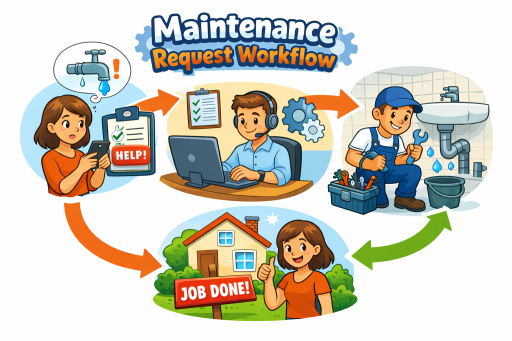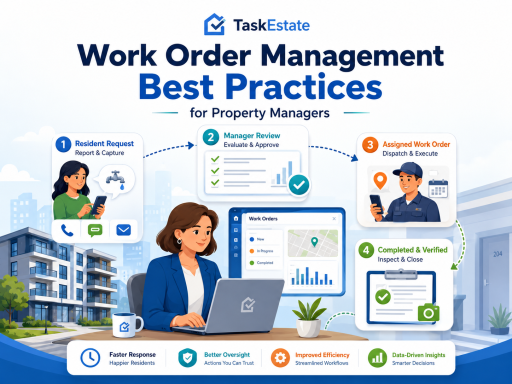
Work orders are the operational heartbeat of property maintenance. When they are managed through emails, spreadsheets, and phone calls, the workflow becomes inconsistent: requests go missing, approvals stall, assignments are unclear, and status updates are hard to trust. The result is predictable—slower response times, frustrated residents, and limited visibility into what is actually happening across properties.
This guide outlines practical, field-tested best practices to help property managers run maintenance with more speed and accountability. It also shows how work orders connect to adjacent operational modules—reporting and inspections—and how location structure and asset context improve long-term performance.
1) Standardize Maintenance Request Intake
The fastest work order is the one that starts with complete, structured information. When requests arrive informally, teams spend time clarifying details and re-keying data, which delays assignment and increases repeat visits. Standard intake ensures every request has the core information needed to triage, approve, and execute.
- Require a clear problem description, location, and urgency.
- Use consistent categories (plumbing, electrical, HVAC, appliance, etc.).
- Capture access notes and preferred entry windows where applicable.
- Establish a minimum information standard before a request can move forward.
A dedicated request channel improves consistency and reduces back-and-forth. For structured intake, use a resident-facing request flow such as the resident maintenance requests portal.
2) Create a Clear Review and Approval Policy
Not all maintenance is equal. Some work should be executed immediately, while other work requires budget review, vendor coordination, or policy checks. A clear approval policy prevents two costly outcomes: unauthorized work that damages budgets and delayed work caused by unclear authority.
Best-practice approval rules typically include:
- Auto-approve common low-cost, routine items (as policy allows).
- Manager review for work above a cost threshold or with safety implications.
- Escalation paths for emergencies and repeated incidents.
- Documentation expectations for approvals, exceptions, and outcomes.
A structured workflow minimizes approval delays and makes accountability auditable. If you are centralizing your broader workflow, align approvals inside your property maintenance software so approvals, assignments, and outcomes remain in one system of record.
3) Assign Work Orders with Ownership and SLAs
Assignment is where many operations lose time. If a work order can be “anyone’s job,” it often becomes no one’s job. High-performing maintenance teams use explicit ownership and service-level expectations so work moves predictably from assignment to completion.
- Assign a single owner (person or vendor) for each work order.
- Define target response and completion times by priority level.
- Use consistent handoff rules for parts delays, access issues, or vendor escalation.
- Prevent “reassignment loops” by clarifying when reassignment is appropriate.
A dedicated workflow helps standardize assignment and reduce ambiguity. For a structured lifecycle from request to completion, see work order management software for property maintenance.
4) Use Standard Statuses and Require Meaningful Updates
Work order visibility depends on two things: consistent statuses and meaningful notes. Without standards, statuses become subjective and reporting becomes unreliable. A simple, consistent status model reduces daily follow-ups and preserves operational history.
A practical status framework (customize as needed) includes:
- New (submitted, not yet reviewed)
- Approved (authorized for execution)
- Assigned (owner identified)
- In Progress (work underway)
- Blocked (parts/access/vendor delay; reason required)
- Completed (work done; documentation required)
- Verified (optional: confirmed via inspection or review)
Require short notes when changing to “Blocked” or “Completed.” This keeps managers informed and reduces repetitive resident follow-ups.
5) Close the Loop with Inspections for Quality and Compliance
In many portfolios, “completed” is treated as the finish line. In practice, the finish line is verified quality—especially for safety, compliance, or recurring issues. Inspections provide a structured way to confirm outcomes, document findings, and trigger follow-up work when needed.
Use inspections when:
- Work is safety-related (electrical, gas, water intrusion, structural).
- The same unit or asset generates repeated work orders.
- Vendor work requires verification and documentation.
- Compliance standards require inspection records.
To formalize verification and follow-ups, connect work orders to property inspection software for buildings and units. This supports the operational adjacency loop: Work Orders ↔ Inspections.
6) Measure Performance with Dashboards and Portfolio Reporting
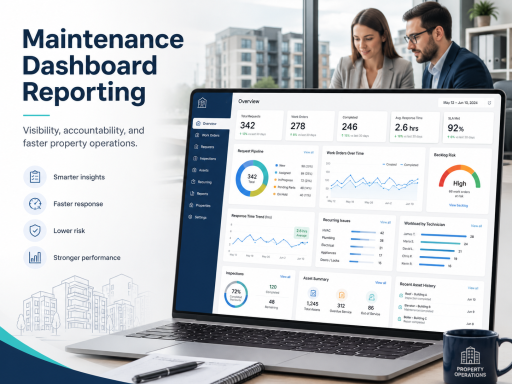
You cannot improve what you cannot measure. Maintenance reporting should answer operational questions quickly: Where is work stalling? Which properties have the most repeat issues? Are response times improving? Who is overloaded?
Track a small set of actionable KPIs:
- Time to approve (intake → approval)
- Time to assign (approval → assignment)
- Time to first touch (assignment → first progress update)
- Cycle time (open → complete)
- Reopen / repeat rate (quality signal)
- Backlog aging by priority and property
Central dashboards reduce manual reporting and make trends visible early. For portfolio visibility and KPI tracking, use maintenance dashboards and reporting for property operations, completing the adjacency loop: Work Orders ↔ Reporting ↔ Inspections.
7) Organize Work by Property, Building, and Unit
Location context is not optional. When work orders are not tied to a consistent property structure, reporting becomes unreliable and maintenance history becomes fragmented. A clean location model improves triage, speeds repeat diagnostics, and enables accurate portfolio reporting.
Location-aware best practices:
- Always link a work order to a specific unit when applicable (not just a property).
- Use building-level grouping for shared systems and common areas.
- Standardize naming conventions to prevent duplicates and confusion.
- Review recurring issues by unit/building monthly to spot patterns early.
To keep maintenance history structured and reportable, use property, building, and unit management.
8) Add Asset Context to Reduce Repeat Work
Work orders get smarter when they are connected to asset history. Without asset context, teams repeatedly troubleshoot the same equipment, lack continuity when staff changes, and struggle to make repair-versus-replace decisions. Asset history turns maintenance into lifecycle management.
Best practices for asset-informed work orders:
- Record installation dates and basic asset details for key equipment.
- Link work orders to assets when issues are equipment-related.
- Review repeat incidents by asset type to identify replacement candidates.
- Use reporting trends to prioritize preventive actions.
For lifecycle visibility, maintain asset installation records for property maintenance, supporting the second adjacency loop: Properties/Units ↔ Assets ↔ Reporting.
9) Reduce Risk with Role-Based Permissions
Maintenance operations involve multiple roles—property managers, technicians, inspectors, and administrators. Without role clarity, approvals can be bypassed, sensitive information can be overexposed, and accountability becomes difficult to enforce. Role-based access keeps governance strong without slowing work.
Common permission patterns include:
- Managers approve and prioritize work for assigned properties.
- Maintenance staff update status and close work orders they own.
- Inspectors document inspections and trigger follow-ups.
- Admins manage configuration and user access.
For controlled access aligned to responsibilities, implement user and role management for property maintenance teams.
Recommended Implementation Order
If you are centralizing operations, implement in this sequence to deliver fast impact:
- Standardize request intake and approvals.
- Enforce ownership, SLAs, and status standards for work orders.
- Turn on reporting to measure cycle time and backlog aging.
- Add inspections for quality verification and compliance.
- Strengthen location structure and asset history for long-term performance.
- Finalize governance with role-based permissions.
Call to Action
Replace emails, spreadsheets, and phone calls with one centralized platform that improves accountability and response time. To evaluate the right plan for your portfolio, review TaskEstate pricing.
FAQ
How do approvals work in a structured work order process?
A structured process routes requests to a review stage where authorized users validate scope and priority before work is assigned. This prevents budget leakage and reduces delays caused by informal approvals buried in inboxes.
Can I track work order status in real time?
Yes. Standard statuses and required notes make progress visible from assignment to completion. This reduces follow-ups and creates a reliable operational history for every unit and building.
Can work be reported by unit, building, or property?
Yes. When work is tied to a consistent location model, performance can be analyzed by unit, building, property, or portfolio. This is essential for identifying recurring issues, staffing bottlenecks, and property-level trends.